Kanji scanner: photo a word, get its readings and meaning

This kanji scanner turns a word you cannot type into one you can look up. Take a photo or drop a screenshot, crop to the word or the line, and you get the kanji back as characters with readings (kana) written over them and a short meaning in your language. Copy the word into a dictionary, a flashcard deck or a message, without hunting for it by radical or stroke count.

Updated

Page 1 with each text block outlined
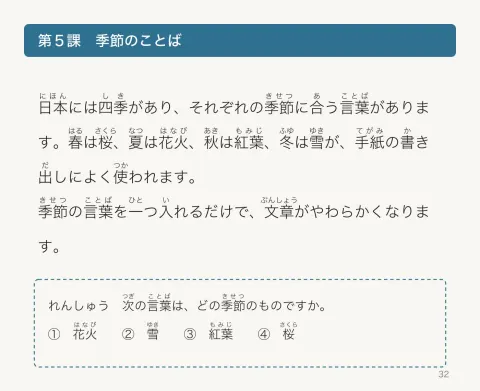
  1. Lesson 5: Seasonal Words

  2. Japan has four seasons, and there are words that suit each season. Cherry blossoms for spring, fireworks for summer, autumn leaves for fall, and snow for winter are often used in the greetings of letters.

  3. Just by including one seasonal word, the writing becomes softer.

  4. Practice: Which season do the following words belong to?

Real run: A Japanese textbook page with furigana above the kanji, read block by block
Layout

Drop a page with Japanese on it

An image, a screenshot from the clipboard, a phone photo or a PDF. JPG, PNG or WebP up to 10 MB.

Add a page to see the price.

New accounts get 7 free credits after confirming their email.

Read by Gemini 3 Flash. Crop, clean-up, readings and export are free.

Sign up free: 7 credits to start

Uploads are private and deleted after 7 days. Your text stays in your history until you delete it.

How it works

  1. 1

    Snap or drop it

    Use the camera on your phone, paste a screenshot, or drop an image. One photo can hold a single word or a whole paragraph.

  2. 2

    Crop to the word

    Drag a box around the word or line you care about so the result is just that. Leave translation on for a meaning, or off for the characters and readings only.

  3. 3

    Copy what you need

    Each block shows the kanji with readings (kana) over them and the meaning below. Copy the kanji alone, with readings in brackets, or as ruby text.

Good for

  • A word on a sign, a label or a station board you cannot read aloud
  • Kanji in a book or a game screenshot you want in your flashcards
  • Names on letters and forms where you need the right reading
  • Checking a reading you are not sure of before you use a word

Real runs

Page 1 with each text block outlined
  1. Lesson 5: Seasonal Words

  2. Japan has four seasons, and there are words that suit each season. Cherry blossoms for spring, fireworks for summer, autumn leaves for fall, and snow for winter are often used in the greetings of letters.

  3. Just by including one seasonal word, the writing becomes softer.

  4. Practice: Which season do the following words belong to?

Real run: A Japanese textbook page with furigana above the kanji, read block by block
Page 1 with each text block outlined
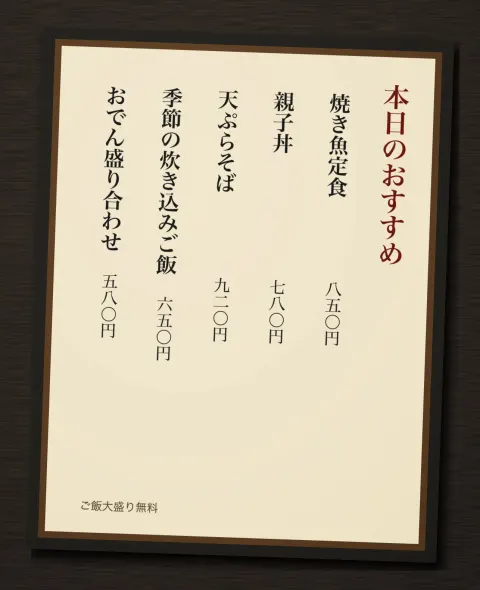
  1. Today's Specials

  2. Grilled Fish Set Meal 850 Yen

  3. Oyakodon (Chicken and Egg Bowl) 780 Yen

  4. Tempura Soba 920 Yen

Real run: A photographed vertical Japanese restaurant menu with prices in kanji numerals

01

Why kanji are hard to look up

You cannot type a kanji you cannot read. Dictionaries let you search by radical, stroke count or handwriting, and all of them take time and patience, especially for a character with twenty strokes. Scanning skips that step: the photo becomes characters, the characters come with their readings in kana, and you can paste them anywhere.

02

Readings in context

Most kanji have several readings, and the right one depends on the word around it. The scanner reads the whole word or line, so the reading it gives is the one used there: 生 in 先生 is せい, in 生きる it is い. For names, which often have unusual readings, check the result against the person or the place when it matters.

03

From the scan to your study notes

Choose how readings are written before you copy. In brackets after the kanji pastes cleanly into most flashcard apps; as ruby notation, which some e-book and note tools turn back into small text above the characters; or not at all. Every scan stays in your history, so a week of words from signs and screenshots is still there when you sit down to study.

Credits per page

The reader shows the exact cost before you run anything. Plans and credit packs

Prices run from $4.45 for the smallest monthly plan to $204.90 for a year of the largest.

StepCredits
Re-translate one block with a note2
Read one page to text7
Read one page and translate it12
Crop, clean-up, readings, copy, TXT and DOCX0

Questions

Does it tell me every reading of a kanji?

It gives the reading used in the word you scanned, written in kana above the kanji. For every possible reading of a single character, paste it into a dictionary.

Can I scan just one word?

Yes. Crop to the word before reading. A single word costs the same as a full page, so cropping is about a clean result, not price.

How do I put the result into flashcards?

Switch readings to brackets and copy the block: you get the kanji followed by the reading in brackets, which most flashcard apps accept as plain text.

Does it work with screenshots from games or apps?

Yes. Paste a screenshot straight from the clipboard, or drop the image file. Stylised fonts are read well in most cases.

Is the image kept?

Privately, for 7 days, then it is deleted automatically. The text and readings stay in your history until you delete them.